
Intercept
The Intercept tab shows an Intent or provider call held at a hook. While it is held, the hooked thread waits for your decision.
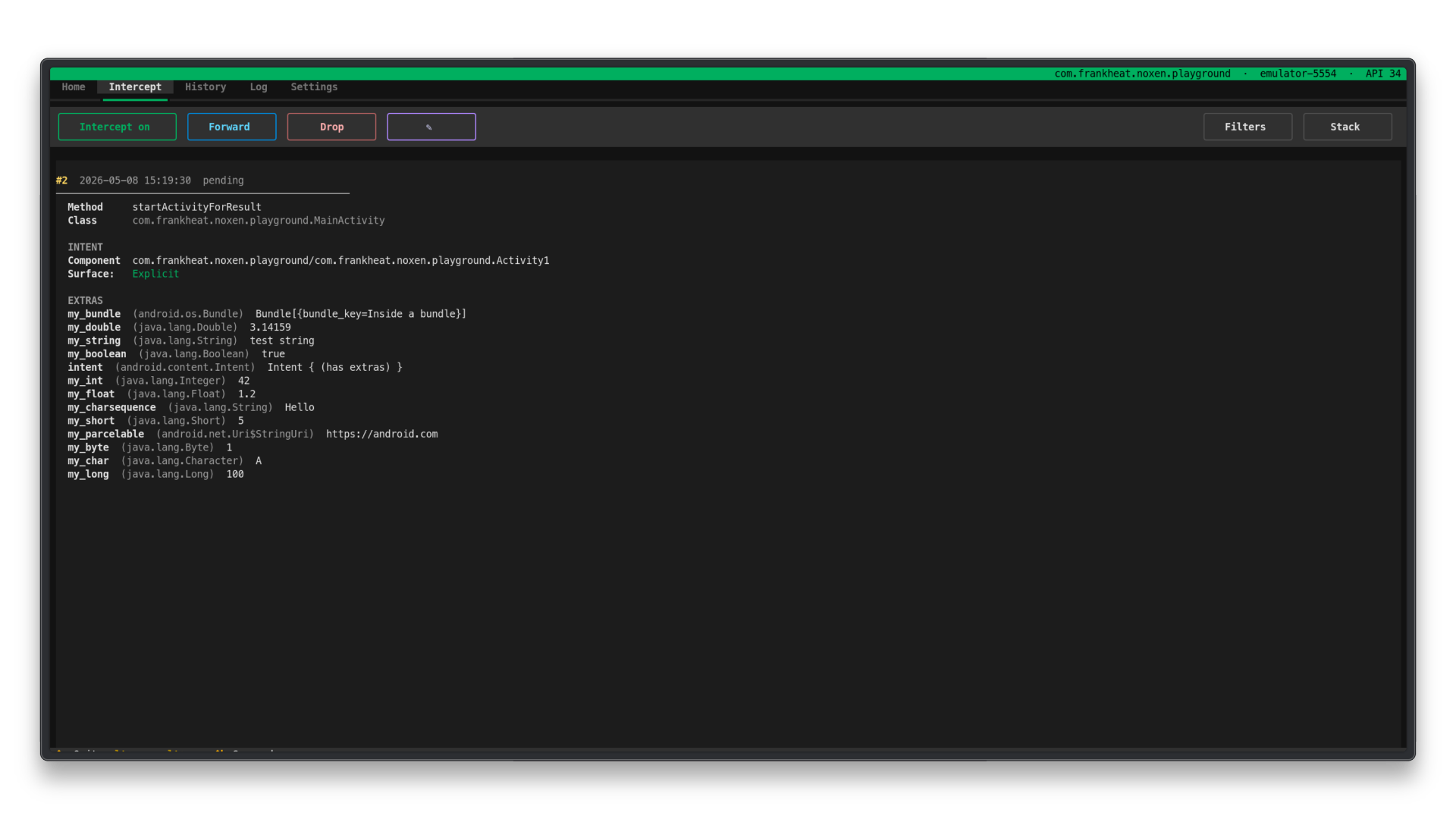
noxen holds one call at a time. Other hooked calls continue while you decide, and are recorded in History. To record without holding anything, turn interception off; to hold fewer calls, use Filters.
Forward or drop
Section titled “Forward or drop”| Action | Shortcut | Effect |
|---|---|---|
| Forward | Ctrl+F | The call continues |
| Drop | Ctrl+D | The call is suppressed |
What a drop suppresses depends on the hook. For a method that receives an Intent,
noxen skips the method and returns a default value. For getIntent(), the getter has
already run, so noxen returns null to the caller. Either way, work the app did before
the hook stays done.
Forward means the call continued. Whether Android delivered the Intent, or the method succeeded, has to be checked on the receiving side.
Edit as JSON
Section titled “Edit as JSON”✎ opens the held Intent as JSON, in the same format and editor as Sender:
{ "component": "dev.noxen.playground/dev.noxen.playground.Activity8", "action": "test.PING", "flags": 268435456, "categories": [], "extras": { "n": {"type": "int", "value": 3} }}| Action | Shortcut |
|---|---|
| Apply your changes and forward | Ctrl+F (Apply & Forward) |
| Discard your changes, keep the Intent held | Esc (Cancel edit) |
| List suggestions | Ctrl+Space |
| Fold or unfold a block | Ctrl+O |
| Unfold everything | Ctrl+N |
noxen applies only what you changed. Deleting a field clears it; deleting an extra removes it. If the JSON is not valid, or a change cannot be made, the line under the editor says why and the Intent stays held.
What you can change
Section titled “What you can change”Everything the JSON shows, with the types that Sender supports:
component,package,action,data,mimeType,flagsandcategories.nullclears a text field;""sets an empty string. Forflags, use a list of Android flag names or an unsigned 32-bit decimal mask. The editor suggests names inside the list. Captured masks stay numeric when noxen cannot name every bit unambiguously.- Extras of every type, including Bundles and Intents. A
longis written as a decimal string. selectorandclipData, which you can also add or remove, and Intents nested in extras, Bundles, the selector or ClipData.
A component is written package/class, for example dev.example/.Activity2. noxen
checks the syntax, not whether the component exists.
package and selector cannot both be set: Android refuses it.
Values not captured in full
Section titled “Values not captured in full”Some values cannot be shown: an object noxen cannot read, or a string longer than the capture limit. They are left out of the JSON, named in the line under the editor, and stay on the Intent unchanged.
noxen makes each change as narrowly as it can, such as one field or one extra. A value that contains something not captured in full is never replaced as a whole, because the hidden part would be lost: only its narrow changes are applied, and the rest is refused with the reason.
Where a change takes effect
Section titled “Where a change takes effect”Changing the component before a send can change where the Intent goes. In a receiving
hook, such as getIntent(), Android has already delivered it: your change affects what
the app reads. A selector affects routing only when the base Intent names no component.
After forwarding, the capture in History shows each change as before and after. If it
shows !, open the detail: an edit may have failed, or noxen could not confirm it.
Intercept provider requests
Section titled “Intercept provider requests”Outgoing provider calls use ContentResolver. Incoming calls reach a provider
in the attached process on Android 12 and later.
When a request pauses, Forward runs it as captured. Use Edit and
Apply & Forward to run it with changes. Drop skips the operation and
throws OperationCanceledException to the caller. Use Filters
to choose which calls pause.
- For a query, you can edit the URI, projection and supported selection arguments. If the query Bundle is already unpacked, you can edit its selection, selection arguments and sort order. Other Bundle keys are preserved.
- For insert and update, you can edit fully captured
ContentValuescontaining strings, integers, longs or booleans. Use decimal strings for long values to preserve all 64 bits. - For file opens, you can edit the URI and the mode or MIME type, depending on
the method. For
call(), you can edit the authority or URI, method and string argument. The extras Bundle is read-only.
Opaque or partially captured arguments keep their original values. Keep the
editable keys and use null to clear a nullable value. If an edit is invalid,
the request stays paused so you can correct it.
Edit provider responses
Section titled “Edit provider responses”When a query you forwarded returns a Cursor, Intercept pauses again before the caller receives it. History records both phases in one entry. The query has already run by this point, so dropping the response cannot undo its effects.
With Capture Cursor previews enabled, the response hold automatically shows the captured rows. A complete supported capture enables Edit immediately. Partial captures show their limit and remain read-only. With automatic previews disabled, Read Cursor reads the table first. Edit opens the columns and typed cells. Change a cell and choose Apply & Forward to return a new MatrixCursor. Forward without changes returns the original Cursor. Turning interception off releases the original response without applying the editor draft.
With interception enabled, forwarding a getType() request stops again before
the MIME type reaches the caller. Select Edit to change {"value": "text/plain"}.
The value accepts a string, including an empty string, or null.
Apply & Forward delivers the edited value. History keeps the original
value and the sent value when they differ. A provider exception is recorded
and propagated directly.
View as JSON
Section titled “View as JSON”Ctrl+T switches between the capture detail and its JSON view. The choice
applies to History too.
The JSON starts with hook, the hooked call, such as
dev.noxen.playground.Activity2.getIntent(). operation appears only when the hook is
itself the sending call. Values that could not be captured in full are listed under
notCaptured. These two fields are for reading: remove them before pasting the JSON
into a Sender request. To Sender in History does this for you.
Provider captures start with the same hook field. When noxen can reconstruct
the request, it shows the operation and its Sender fields. Otherwise, it shows
the captured arguments. The response object contains the returned value or
type and any captured Cursor data.
Read the detail
Section titled “Read the detail”| Section | Shows |
|---|---|
| HOOK | The hooked class and method. For a receiving hook, whether the class is exported and the permission that guards it |
| ROUTING | For a send: explicit or implicit, and the Target Android resolved, with its export and permission |
| CAPTURED INTENT PAYLOAD | Component, action, data, MIME type, package, flags and categories |
| SELECTOR, CLIP DATA | The selector Intent and the ClipData items, when present |
| PENDING INTENT | The flags of a PendingIntent request |
| EXTRAS | Each extra with its type and value |
| STACK TRACE | The caller’s stack, when stack traces are on |
- Permissions. Export and permission describe a component as declared. They do not confirm where Android delivered the Intent. See Info app.
- Broadcast permissions. Required Permission restricts which senders reach a component. Receiver Perm, on a send, restricts which receivers get the broadcast.
- Implicit broadcasts. Android resolves only receivers declared in a manifest, so a
broadcast to dynamically registered receivers shows Target
(unresolved). - ClipData. URI grant flags describe what the Intent requested. noxen does not open the URI or check access.
- PendingIntent. The capture records the request to create it. Android may return
an existing token, and a later
send()is not captured here. - Null Intent. An absent Intent can be forwarded or dropped, but not edited.
Capture limits
Section titled “Capture limits”noxen reads scalars, Intents, Bundles, arrays and standard lists. Other objects are
shown as opaque; noxen does not call their getters or toString().
| Limit | Value |
|---|---|
| Nesting | 8 levels |
| Entries per container | 50 |
| Values per capture | 300 |
| String or key length | 2,048 UTF-16 code units |
A Bundle is also read only up to three read errors. Check for omission and truncation markers before treating a capture as complete.